CSRF with Magic Links
As a recap, a Magic Link contains an encrypted token containing the identity of a particular user. By that definition, anyone clicking that link can impersonate the identify encoded in the link. Doesn't that sound familiar? (Cough, Cough - Netflix)
In order to prevent that we need a way for the link to only work for the original requester, and that is where CSRF tokens come in handy.
CSRF + Cookies
Before discussing CSRF tokens with Magic Links, let's take a look at how CSRF tokens work with cookies. After a user gets authenticated, a cookie is usually created by the server and assigned to the user. This cookie would contain data identifying the user, and will be attached to every request made by the user to the server. Knowing this, an adversary could trick users into submitting authenticated transactions without their knowledge. A common example would be the user visiting the adversary site which triggers requests to a known webapp used by the user.
<!-- Adversary site has the following elements -->

 <!-- A form that secretly performs a POST
  to a known site used by the User -->
<form action="https://bank.example.com/transfer" method="POST">
  <input type="hidden" name="to_account" value="attacker123">
  <input type="hidden" name="amount" value="1000">
</form>

<!-- OR -->

<!-- Loading an img element which basically
 performs a hidden GET request -->
<img src="https://bank.example.com/transfer?to=attacker123&amount=1000">
In order to prevent such attacks, the CSRF token needs to be sent with the requests alongside the authentication cookies. The server will compare the request's CSRF token with the session's state, which could either be stored server-side like in Redis, or in our scenario, in the encrypted cookie.
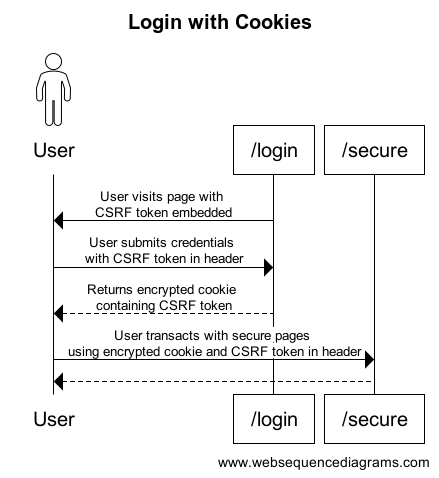
The above sequence diagram shows the following:
- When the user navigates to the /login page, a CSRF token generated by the server is present in the meta tag of the page.
- Upon logging in, the CSRF token is attached in the header of the POST request along with the login credentials.
- The server verifies the credentials and, if successful, creates an encrypted cookie containing the user's identity along with the CSRF token.
- Any future authenticated requests made to the server will have the attached CSRF token in the header compared with the CSRF token stored in the encrypted cookie. Even if the cookie is valid, an invalid CSRF token check will render the request invalid.
There is no way for an adversary site to capture this CSRF token embedded in our site.
CSRF + Magic Links
A Magic Link basically has the encrypted cookie as part of the URL. The question now is how does the user send the CSRF token in the header by just clicking a link? You might have noticed when using certain secure sites like banking, there is some sort of "/verification" intemediary page before the site shows you your dashboard. This intermediary page actually captures the encrypted cookie in the Magic Link along with the CSRF token in the browser and performs the actual POST request of logging into the secure site.
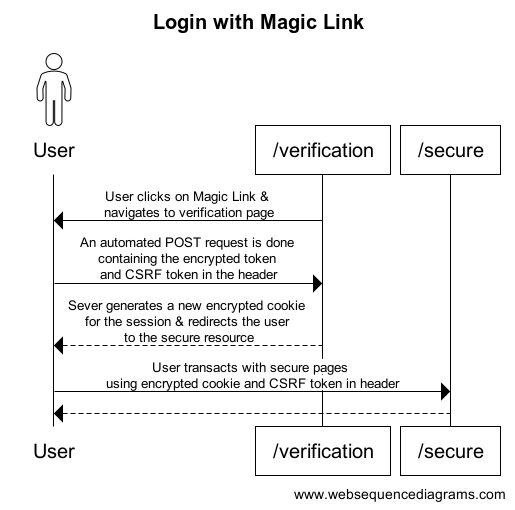
The above sequence diagram shows the following:
- The Magic Link navigates the user to the "/verification" page.
- The "/verification" page performs a POST request with the encrypted cookie and CSRF token to login the user.
- The server decrypts the cookie and compare the embedded CSRF token, with the token in the header.
- If valid, a new session is created for the user with a new encrypted cookie returned to the user.
- Future requests to the secure site, will have the encrypted cookie in the request. The client will have to send the CSRF token in the header for the requests to be successful.
When navigating the secure site through the UI, the CSRF token can be easily accessed to be attached to the request. However, if the user were to click on a link to access the site, a "/verification" page willstill be needed to properly authenticate the user by capturing the CSRF token in the browser.
So back to the issue at hand, the Magic Link needs to only work in the same browser that triggers the Magic Link generation. Similar to the /login page example in the previous section, the CSRF token is embedded in the browser when the users generate a Magic Link with their email. Therefore, the Magic Link sent to their emails will only work if the users open the links with the same browser session that triggered the generation; as that is where the CSRF token is embedded.
Implemention
In this section we will cover the implementation details for a minimal CSRF Magic Link example with Go, Gin, HTML templating, and HTMX.
HTMX is amazing but we will not be covering that in this post.
The web server is setup as follow:
package main

import (
	"crypto/rand"
	"net/http"

	"github.com/gin-contrib/sessions"
	"github.com/gin-contrib/sessions/cookie"
	"github.com/gin-gonic/gin"
	"github.com/gorilla/securecookie"
)

func main() {
    // (1) Defining keys & store
	authKeyMagic := make([]byte, 32)
	encryptKeyMagic := make([]byte, 32)
	rand.Read(authKeyMagic)
	rand.Read(encryptKeyMagic)
	codec := securecookie.New(authKeyMagic, encryptKeyMagic)
	codec.MaxAge(60 * 60 * 15)
	codecs := []securecookie.Codec{codec}

	authKeyCookie := make([]byte, 32)
	encryptKeyCookie := make([]byte, 32)
	rand.Read(authKeyCookie)
	rand.Read(encryptKeyCookie)
	storeCookies := cookie.NewStore(authKeyCookie, encryptKeyCookie)
	storeCookies.Options(sessions.Options{
		Path:     "/",
		MaxAge:   60 * 60 * 60 * 3,
		HttpOnly: true,
		Secure:   false,
	})

    // (2) Routes
	router := gin.Default()
	err := router.SetTrustedProxies([]string{"127.0.0.1"})
	if err != nil {
		panic(err)
	}
	router.LoadHTMLGlob("templates/*.go.tmpl")
	router.Static("/static", "./static")
	router.Use(sessions.Sessions(COOKIE_STORE_NAME, storeCookies))
	router.POST("/magic/generate", handleMagicLinkGeneration(codecs))
	router.POST("/magic/verify/:magic", handleMagicLinkVerification(codecs))
	router.GET("/magic/verify/:magic", func(c *gin.Context) {
		c.HTML(http.StatusOK, "check-auth.go.tmpl", gin.H{
			"route": "",
		})
	})
	router.GET("/secure/:id", func(c *gin.Context) {
		c.HTML(http.StatusOK, "check-auth.go.tmpl", gin.H{
			"route": c.Request.URL.Path,
		})
	})
	router.POST("/secure/:id", handleSecure)
	router.GET("/login", MiddlewareNoCache(), func(c *gin.Context) {
		c.HTML(http.StatusOK, "login.go.tmpl", gin.H{
			"csrfToken": generateCsrf(),
		})
	})
	router.Run()
}
(1) Defining keys & store
The reason why we have 2 keys, is that one is used for HMAC while the other is for encryption. HMAC is needed so that adversaries are not able to successfully mutate the ciphertext of the encrypted cookie such that the decrypted version is still semantically valid.
We also define 2 separate key pairs as one is for Magic Links, while the other is for the actual encrypted session cookies.
The expiry of the keys are defined here as well and should match what is stated in the Non-Functional requirements.
(2) Routes
You may have noticed that secured routes have both a GET and a POST method. This is to support URL navigation, whereby the check-auth page is rendered to capture the CSRF token in the browser before attempting to retrieve the secured resources with a POST.
(3) Minimal Javascript
// Read from meta tag and store in localStorage
const csrfMeta = document.querySelector('meta[name="csrf-token"]')?.content;
if (csrfMeta) {
  localStorage.setItem('csrfToken', csrfMeta);
}

// Attach CSRF token from meta tag or localstorage to HTMX request
document.addEventListener('htmx:configRequest', (event) => {
  event.detail.headers['X-CSRF-Token'] =
    csrfMeta || localStorage.getItem('csrfToken')
});
With HTMX, there is minimal need to introduce javascript into our webapp. However, as we will be using the browser's localstorage to store the CSRF token, javascript is still needed. The above code snippet shows the minimal code needed to store and retrieve the CSRF token.
Demo
The above video shows the full capabilities of our Magic Link site!
- ← Previous
Magic Links - Next →
pprof & Load Testing